
How does Codex use computers? Three entry points and access borders
IT'S NOT ABOUT GIVING AI MORE AUTHORITY, IT'S ABOUT CHOOSING THE LINE OF ACTION

Original title: Three Ways Codex Can Use a Company
original by jason
Photo by Peggy Block Beats
Editor by: This article combes three portals to Codex operating the external environment: Computer Use, Chrome Extension and Application in Brownser. The three seem to be working on the issue of "computing Codex with a computer" but it corresponds to different mission scenarios, permission boundaries and levels of trust。
Of these, Computer Use has the widest coverage and can directly operate the authorized primary applications, system settings, iOS emulators and even multiple applications. It suits GUI processes that are not supported by API, plugins or structured tools, but at a much slower cost and with the widest access boundaries. The Crome extension is suitable for missions that rely on login, cookies, multiple tabs and browser identities, such as Gmail, LinkedIn, Salesforce, internal backstage, or login studies across multiple websites. The application Browner is more development-oriented and calibrated, especially for local services, visual bugs, responsive layouts and design notes; it does not inherit the user ' s normal browser log-in status, is narrower, but is more isolated。
The core of the article is that Codex is not the only "computer" approach, but that it is really important to choose the narrowest, safest, most structured interface on mission. If you can use a plugin or MCP, you should not first use visual control; if the task involves only web development, you should give priority to the application Brownser; if you need a user browser identity and login status, switch to Crome; and when the structured tool cannot be covered and the task has to rely on a desktop graphic interface, it is the last kilometre。
Appshots is not the fourth way to control a computer, but the tool to point the current context to Codex. It solves the context input problem, while Browner, Chrome and Company Use solves the operational problem. By looking together, this layer actually reveals the key to AI Agent’s productization: rather than giving the model unlimited access, it is keeping it narrow in specific tasks, clarifying boundaries and allowing users to retain the right to audit critical operations。
The following is the original text:
Codex uses computers in three ways: Computer Use, Chrome extension, and application of internal browsers。
There is some overlap between them, which is quite confusing。
After reading this article, you'll know how to install and trigger these three ways, how to use them, how to connect them with Appshots and Devloper Mode, and what to write in AGENTS.md, so that Codex can choose the right interface。
The simple version is:
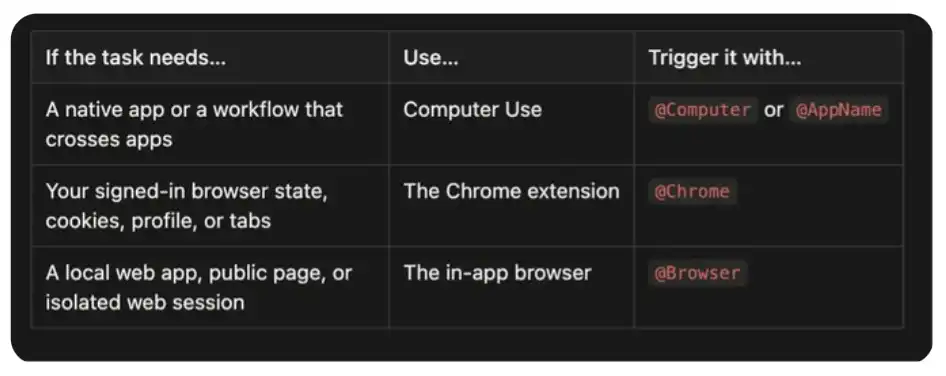
Nevertheless, the use of plugins or MCPs is preferred, as long as possible. For example, a Slack plugin can search a thread more precisely than a click around a Slack; the operation generated by the GitHub plugin is easier to check than to make the Codex drive web page. Visual control is best suited to reach borders where structured tools are available。
@Computer
Computer Use is the most widely covered of these three interfaces. It allows Codex to view and operate graphical interfaces on MacOS and Windows, including windows, menus, keyboard input, and the clipboard you authorize in applications。
It's usually the slowest. Structured plugins can call API directly; Computer Use needs to observe interfaces, determine where to click, wait for application responses and check the next state. This visual cycle is time consuming, but it also means that Codex can operate on applications that are completely unusable for API。
On MacOS, slow doesn't necessarily mean you'll be disturbed. Computer Use can operate your authorized applications in the backstage, and you can still use the rest of the computer. A lot of times, when I opened an application with Codex, I found that Codex had done a working stream quietly backstage。
According to which applications you installed and authorized on your computer, these can include Spotify, Xcode, System Settings, iOS simulators, or even iPhone Mirroring to control your iPhone. It can also switch between multiple applications and handle workflows across different applications。
It can be used when the mission relies on:
Native desktop applications such as Spotify or financial applications
iOS simulator, iPhone Mirroring, or other processes that can only be operated through a graphical interface
System or application settings
NO PLUGIN OR API DATA SOURCE
Workstreams need to be switched between multiple applications
The last step that is missing in a structured integration。
Installation: Opens Settlings & gt; Computer Use of Codex and then clicks Install。
Trigger mode: refer to @Computer, or explicitly require Codex to use Computer Use. As the capacity of the model improves, it will be called itself in the future when needed。
A few examples can be given:
My favorite example is that a package was stolen. Amazon told me it would take about 25 minutes to get to the passenger service. I gave a Cordex thread to Computer Use to check the chat window every five minutes, and then the passenger uniform was checked every minute, and I tried to get my refund. When I get back from the shower, the refund is complete。
Use @Computer to open Spotify, find my Discover Weekly Playlist, and start it. Do not change my account or subscription settings. Use @Computer to open iPhone Mirroring, take the loading bug in the iOS app, and take a screenshot of the fairy state.
I also use the Computer Use as the last kilometre in the structured workflow. In one release video, Codex can read feedback from Slack, modify codes and render new videos, but the Slack integration in that thread could not upload files at that time. As a result, Computer Use clicked Add file to fill this missing step。
It is also the broadest of the three. It is given only one clear application or process at a time. Closes when certain sensitive applications are not part of the mission; carefully inspects the access window; and is best monitored in the presence of a person when financial, account, payment, voucher, privacy and system security changes are involved。
Handle multiple tabs and login status with @Chrome
The Codex Chrome Extension allows Codex to access the Chrome status you have login. This should be used when the task depends on the account number, the cookies, the browser profile or the tab you have opened and certified。
These interfaces are suitable for work in the following tools:
Gmail or LinkedIn
Salesforce or backstage
Internal dashboards
Log-in studies across multiple websites
Reliance your account number or an extended browser form。
Installation: Opens the Plugins of Codex, adds Chrome and operates according to the settings process. Codex will guide you to install the Cordex Chrome extension and approve the Chrome permissions. Starts a new thread when the extension is shown。
Trigger: refer to @Chrome, or explicitly request Codex to use your login Shrome browser:
Us @Chrome to review the open CEO account, compare it with the support picket in the other tab, and Draft the missing fields.
The Chrome task will run in the tab group, which will help to group the tabs associated with a Cordex thread. This interface carries your browser identity. It makes it stronger and more sensitive。
Another major advantage is multi-platform control. Chrome can link multiple tabs to the same task, read context in one page, cross information in another page, and continue the workflow on the third page. The Computer Use can also drive the browser visually, but Chrome understands the task as a browser workflow instead of a series of screen coordinates。
Recently there was a thread, and I gave Codex an already opened Strudel Composer tab to make music more interesting. Chrome gave it the selected tab and the WebMCP tool that this page revealed. Codex checked the music structure, rewrited the chorus and the four-minute whole form, modified the speed, preserved the track and allowed it to continue playing. It does not need to visualize every control on the interface because Chrome can combine the context of the tab and the structured capabilities provided by the page。
I also used it to run a long-term twitter thread. The broad directives are:
Every day, use Crome to check my DMs, read relevant news, and look for feedback or documents I should know about.
It's interesting, not that Codex can turn on Twitter, but that the thread can go back to the same log-in environment, connect the found contents to local files, and leave a result that I can examine。
The boundaries of trust here are important. The website may consider Cordex’s hits, form submissions and messages as actions taken by you. The content of the web page itself is not a trusted input. A clear distinction is made between steps that are more serious: research, navigation and drafting can be done automatically; you are required to review them before they are sent, published, purchased or submitted。
If the whole task is done in the browser, prefer the Chrome to the Computer Use. Chrome has the original context of the browser required for such tasks without extending access to the entire desktop。
Use @Browser to process the website you're developing
Apply the inside browser is the browser that exists within the Cordex thread. You and Codex share the same rendering page, so it is especially suited to build and debug Web applications。
I usually start here:
Local development servers
Preview pages based on documents
Open pages that do not require login
replay visual bug
Checking response layouts
Leaves the design feedback for the page elements。
its most important constraint is isolation. apply an internal browser does not use your normal browser configuration file, cookies, extensions, login sessions or existing tab pages. this is a limitation when a mission requires account identification; but when a mission does not need an account number, it is a useful border。
Settings: Opens the Plugins of Codex, adds the Browner plugin and enables it。
Trigger: refer to @Browser in the hint, or explicitly require Codex to use an application browser:
Use @browser to open vite app on http://localhost:3000/, reproduce the mobile overfug, fix it, and verily the same route again at dissktop and mobile phones.
This will result in a close feedback loop: Codex can edit codes, operate pages, check renderings, screenshots, and then revalidate the same process after repair。
My favorite part is label. When I evaluate a local application, you can click directly on an element or select an area and leave comments. Style controls also allow me to preview and give more precision to text, font, spacing and colours. I usually combine it with voice input, process direction: I review pages, leave comments, and continue to line up for more comments when Cordex processes current feedback. The page itself became specifications。
This is particularly useful for design work. I often ask Codex to sort an idea, a research package, or a project into a single file, index.html, and then open it with an application browser. Compared to trying to describe the design package in another hint, I can put it directly on the real page, "This level is the opposite" "not so much like a card" "These controls need more space" or "this word ratio for all stations." Codex receives comments with relevant screenshots and elements in context, changes the file and then reopens the same page to the next round。
Create a single file index.html for this project brief and open it in the in-app @Browser.
This cycle feels closer to working with a designer on the same canvas than back-to-back intercepts and text description。
Application of internal browsers is also appropriate as the starting point for mixed workflows. On the other line, I opened an X post with an application browser to get Cordex to investigate the discussion. Visible pages help it to confirm which post I am referring to; then Cordex switches to Twitter CLI and retrieves 38 responses, including embedded responses hidden from the browser view. This is the practice of the principle of "using a narrowest interface": to confirm the context on the screen with a browser, and to make deeper searches with a structured tool。
There are trade-offs. Applying the isolation of the internal browser makes it a good development interface, but it also means it is not suitable to handle Google login, passkey, or web sites that rely on browser extensions. When identity matters, switch to Crome。
Appshots
Appshot is not the fourth way Codex controls computers. It's a way to point Codex in the context before your eyes。
On Mac, press CMD twice to capture the nearest window. Codex will attach a picture and all available text to the thread. You can do Appshot with an error, an email, a design, a setup panel, or a strange form, and then you can just say:
This is the most easy mental model I can remember: Appshots is the way you point at something on a computer; Brownser, Chrome and Company Use are the way that Codex acts。
Appshots is currently created through the MacOS Codex application. It captures the front window, not the entire desktop. This makes it a very useful way: you can provide a focus context without giving control over the application。
How to follow up on these developments
These interfaces change quickly. If you want to get practical details instead of waiting for a big announcement:
Focus on Ari Weinstein (@AriX), know Company Use and Appshots
Following James Sun (@JamesZmSun) about Brownser
Concerned about Andrew Ambrosino (@ajambrosino), about Codex applications and the larger desktop product narrative
Watch OpenAI Developers (@OpenAIDevs) and learn more about Codex and OpenAI Platform news。
[ Chuckles ]Original Link]
